-
Firefox 3 has built-in color profile support, but it's not enabled by default. [via nelson]
Famers' Market Sounds
Corvallis has a great Farmers' Market and we try to go every Saturday. They block off 1st street by the river (view from above) and a few city blocks are filled with local vendors selling food.
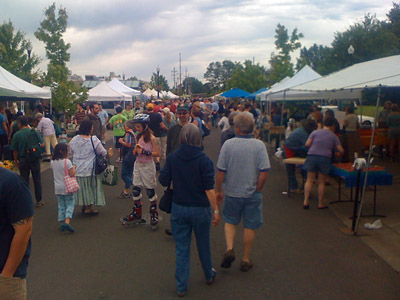
Here's what walking through the farmer's market sounded like yesterday:
If you listen you can hear a guy playing a didgeridoo, kids screaming as they run through a fountain, a few guys playing jazz, dogs panting, and lots of snippets of conversations. The best reason to go to the Farmers' Market right now? Oregon Hood strawberries are in season. We made this fantastic strawberry shortcake with Hood berries from the market:
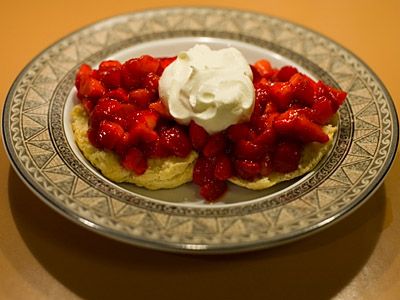
Best. Strawberries. Ever.
Here's what walking through the farmer's market sounded like yesterday:
If you listen you can hear a guy playing a didgeridoo, kids screaming as they run through a fountain, a few guys playing jazz, dogs panting, and lots of snippets of conversations. The best reason to go to the Farmers' Market right now? Oregon Hood strawberries are in season. We made this fantastic strawberry shortcake with Hood berries from the market:
Best. Strawberries. Ever.
-
I want one of these orchard ladders for cherry-picking in a couple weeks.
-
Looks like a good place to find information and ask questions about fruit trees.
-
from wikipedia
-
Andy Baio interviews Alan Taylor about his amazing new blog The Big Picture. I'm surprised there wasn't more resistance at The Globe.

-
This Yahoo! Stencil Kit looks like a good way to mock up iPhone apps in Illustrator. [via CreativeTechs Tips]
-
"Buying a new home, rearranging your room, or moving into a new office? You can save time and have more fun if you lay out your ideas ahead of time." Looks like nifty web app.
-
tl;dr
-
A web comic about branding. [via Brand New]
-
The Web's favorite tinsmith resigns his post with the Yahoo Web Trust for a more pastoral way. [via waxy]
-
Some clever CSS/JavaScript hacking that determines which sites on a list someone has visited. Used for questionable good here, but could be a privacy nightmare. [via hackszine]
-
"...good practices of pagination design as well as some examples of when and how the pagination is usually implemented." [via swissmiss]
-
Good thoughts for feed reader designers.
Chip Ross Sounds
You're probably wondering what Chip Ross Park (view from above) sounds like in the afternoon. I can finally answer that for you.
Backyard Sounds
Speaking of sounds, here's what my backyard sounds like around 5am.
Now that spring is here and I'm sleeping with the windows open I often wake up to this around 5. There's even one bird I call the alarm clock bird that I'd like to catch on tape sometime.
Now that spring is here and I'm sleeping with the windows open I often wake up to this around 5. There's even one bird I call the alarm clock bird that I'd like to catch on tape sometime.
Gel 2008
Last week I went to New York for Gel 2008, a conference about good experience. They invite people from varied disciplines to talk about their experience with providing experiences. The first day all attendees break into small groups for a direct experience of some kind, and the second day is a traditional conference with a series of presentations.
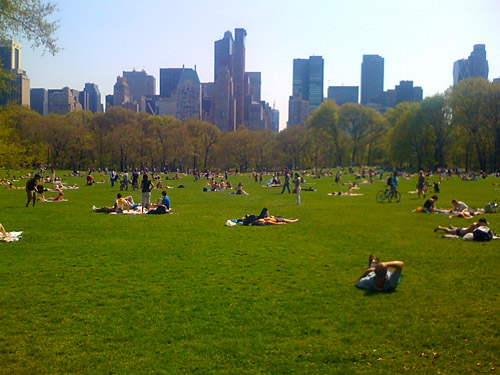
My activity on the first day was a sound walk in Central Park. Around 12 Gel attendees met near Central Park South where we were promptly blindfolded, asked to hold onto a rope, and led into the park. I managed to snap a quick cell phone picture before we started moving.
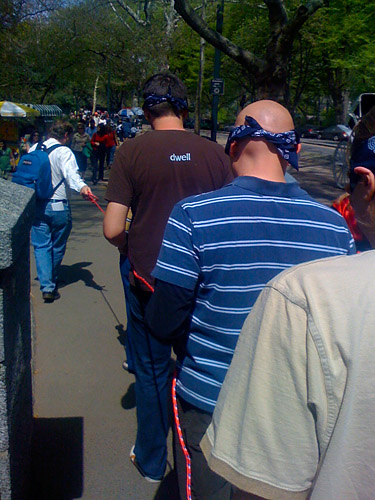
At first I was worried about falling on my face, but we moved slowly and the path was flat. Nothing focuses your other senses like moving through space without sight. I heard lots of details in the Central Park soundscape, but it was all overwhelmed by voices. As a group of 12 people walking through the park blindfolded, we were very conspicuous. And we had a running commentary (bordering on heckling) from people as we listened which definitely detracted from the experience. After regrouping, our host Douglas Quin talked with us about sound.
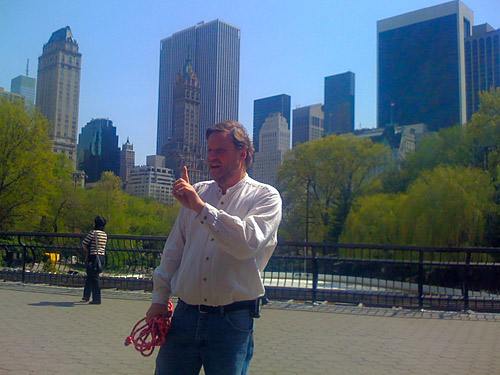
We continued walking in silence through the park (sighted), listening to the way the different park geographies affected sound. We occasionally stopped to discuss our progress, and this was the most instructive part of the day. It didn't hurt that it was a gorgeous, sunny day.
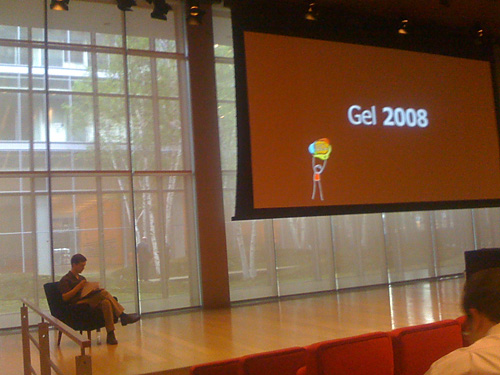
The second day of Gel looked more like a conference. What I like about their approach is that they pull in people from across industries. Clay Shirky (I've seen him speak several times at tech conferences) kicked off the day and was followed by a designer, filmmaker, professor, brewmaster, psychiatrist, and several authors and artists. As much as I think the tech community has some things to teach other industries, Gel reminded me that other businesses have been around for a long, long time and also have many lessons to share. I'm going to make an effort to expand my daily reading list to non-web folks. (Radical, I know.)
The most disturbing talk of the day was by Natasha Schull, an assistant professor in Science, Technology, and Society at MIT. She described the way the gambling industry relates to their customers, and it sounded to me like a cautionary tale. Their marketing materials discuss maximizing "time on device" and achieving "player extinction" (a gambler running out of money), which makes them sound inhuman. She suggested optimization of customer relationships over maximization.
Gel was fun and a nice change of pace from tech conferences. It would benefit from a more coherent theme—there was no big picture at the end for me. But I definitely experienced New York City in a new way thanks to the conference, and living briefly in the city's energy was definitely a good experience.
My activity on the first day was a sound walk in Central Park. Around 12 Gel attendees met near Central Park South where we were promptly blindfolded, asked to hold onto a rope, and led into the park. I managed to snap a quick cell phone picture before we started moving.
At first I was worried about falling on my face, but we moved slowly and the path was flat. Nothing focuses your other senses like moving through space without sight. I heard lots of details in the Central Park soundscape, but it was all overwhelmed by voices. As a group of 12 people walking through the park blindfolded, we were very conspicuous. And we had a running commentary (bordering on heckling) from people as we listened which definitely detracted from the experience. After regrouping, our host Douglas Quin talked with us about sound.
We continued walking in silence through the park (sighted), listening to the way the different park geographies affected sound. We occasionally stopped to discuss our progress, and this was the most instructive part of the day. It didn't hurt that it was a gorgeous, sunny day.
The second day of Gel looked more like a conference. What I like about their approach is that they pull in people from across industries. Clay Shirky (I've seen him speak several times at tech conferences) kicked off the day and was followed by a designer, filmmaker, professor, brewmaster, psychiatrist, and several authors and artists. As much as I think the tech community has some things to teach other industries, Gel reminded me that other businesses have been around for a long, long time and also have many lessons to share. I'm going to make an effort to expand my daily reading list to non-web folks. (Radical, I know.)
The most disturbing talk of the day was by Natasha Schull, an assistant professor in Science, Technology, and Society at MIT. She described the way the gambling industry relates to their customers, and it sounded to me like a cautionary tale. Their marketing materials discuss maximizing "time on device" and achieving "player extinction" (a gambler running out of money), which makes them sound inhuman. She suggested optimization of customer relationships over maximization.
Gel was fun and a nice change of pace from tech conferences. It would benefit from a more coherent theme—there was no big picture at the end for me. But I definitely experienced New York City in a new way thanks to the conference, and living briefly in the city's energy was definitely a good experience.
McMuffin, McNuggets, and The Wire
When I heard that Herb Peterson, inventor of the Egg McMuffin died recently, I couldn't help but think of this scene from The Wire (warning: language NSFW).
In that scene D'Angelo is teaching his idealistic co-workers a more cynical view of business. He argues that the inventor of McNuggets is probably still slaving away in the McDonald's basement while the people at the top of the company are raking in money from McNugget sales. The Wikipedia page about Chicken McNuggets doesn't mention a specific inventor, so it could be true. Or, maybe more fitting, the McNugget was invented by committee. I've had my share of both McMuffins and McNuggets, but if I had to choose one over the other it'd be the McMuffin without question. (Though I'm trying to quit, honestly.) Sounds like Herb did ok.
In that scene D'Angelo is teaching his idealistic co-workers a more cynical view of business. He argues that the inventor of McNuggets is probably still slaving away in the McDonald's basement while the people at the top of the company are raking in money from McNugget sales. The Wikipedia page about Chicken McNuggets doesn't mention a specific inventor, so it could be true. Or, maybe more fitting, the McNugget was invented by committee. I've had my share of both McMuffins and McNuggets, but if I had to choose one over the other it'd be the McMuffin without question. (Though I'm trying to quit, honestly.) Sounds like Herb did ok.
kottke.org is ten
I can't believe it, but kottke.org is ten years old today. I had a little fun at Jason's expense last week with a single serving site that lets you know whether or not Jason has a guest author or is posting himself, here. But the fact is, Jason's media filter has been a daily read for me most of those ten years (I remember when it was notes), and he's continually improving his editorial skill while many weblogs rise up and die in the space of months. Ten years is a big milestone. Congrats, Jason!
Analyzing Rockwell
I recently read an entertaining book by Richard Halpern called Norman Rockwell: The Underside of Innocence. (Here's an excerpt from the book.) I heard about it last year in a segment on On The Media called Not So Innocent. Rockwell's illustrations are a piece of American cultural DNA (and still a big business), and Halpern examines this piece under a Freudian microscope.
The Freudian analysis was interesting, but my favorite sections of the book discuss the line between commercial art and fine art, and the ways mass produced art draws from fine art. Halpern quoted Clement Greenberg several times, who wrote an essay called Avant-Garde and Kitsch. I had a fuzzy idea of what kitsch meant, but viewing the term through Rockwell's work helped me understand it. Basically, according to Greenberg, kitsch art steals proven ideas from earlier avant-garde art, and turns them into products.
Norman Rockwell is one of those artists people feel very strongly about, so it's no surprise this book riles people up. The Freudian interpretations of his illustrations attack the foundation of innocence that his illustrations are supposed to represent. But beyond the exploration of innocence and disavowal, there's a fascinating case study in the road from high art to mass produced kitsch. And I'll definitely never look at a Norman Rockwell the same way again.
The Freudian analysis was interesting, but my favorite sections of the book discuss the line between commercial art and fine art, and the ways mass produced art draws from fine art. Halpern quoted Clement Greenberg several times, who wrote an essay called Avant-Garde and Kitsch. I had a fuzzy idea of what kitsch meant, but viewing the term through Rockwell's work helped me understand it. Basically, according to Greenberg, kitsch art steals proven ideas from earlier avant-garde art, and turns them into products.
The precondition for kitsch, a condition without which kitsch would be impossible, is the availability close at hand of a fully matured cultural tradition, whose discoveries, acquisitions, and perfected self-consciousness kitsch can take advantage of for its own ends. It borrows from it devices, tricks, stratagems, rules of thumb, themes, converts them into a system, and discards the rest. It draws its life blood, so to speak, from this reservoir of accumulated experience.Halpern lays out the case that Rockwell took many ideas perfected by Dutch masters such as Vermeer and Jan Steen, and transposed an idealized America into 17th Century Dutch interiors. I'm simplifying his argument, but watching Halpern map connections between famous Rockwell images and earlier classics is fun.
Norman Rockwell is one of those artists people feel very strongly about, so it's no surprise this book riles people up. The Freudian interpretations of his illustrations attack the foundation of innocence that his illustrations are supposed to represent. But beyond the exploration of innocence and disavowal, there's a fascinating case study in the road from high art to mass produced kitsch. And I'll definitely never look at a Norman Rockwell the same way again.